Showing posts with label youtube. Show all posts

Saturday, 11 May 2013
Facebook StumbleUpon Twitter Google+ Pin It

Find the hidden patterns with YouTube’s new Analytics API

Author PhotoBy Ted Hamilton, YouTube Analytics

Cross-posted from the YouTube API Blog

Trying to figure out how YouTube’s one billion monthly users are interacting with your videos? Try the new YouTube Analytics API to get custom reports of the YouTube statistics you care about in a direct JSON or CSV response, perfect for dashboards and ad hoc reports.

The new API includes all the standard view and engagement metrics you would expect, including views, shares, and subscriber numbers. Compared to the previous Insight Data API, you also get:
  • Watch metrics: Track estimated minutes watched across channel, content owner, or video, and dive into the video details with average view time and average view percentage.
  • Earning performance metrics: Track estimated earnings (net revenue) from select advertising sources across your content.
  • Ad performance metrics: Break down video performance with monetized playbacks, ad impressions, gross revenue, and cost per impression reports.
  • Annotation metrics: Optimize overlays/annotations with click through and close rate metrics.
Client libraries and code samples
You’ll find client libraries for the languages you use most, with nine different languages available today. You can also make HTTP RESTful requests directly, and with our API Explorer, you can try out sample reports before writing any code.

Don’t write your code from scratch! Get started with code examples in Java, JavaScript, Python, and Ruby. If you want a step-by-step walkthrough of building a complete web application, have a look at our JavaScript exercise.

App examples
Check out some apps that are already using the API:

app screen shot

  • Next Big Sound provides analytics and insights for the music industry by tracking billions of social signals including YouTube. This enables record labels, artists, and band managers to make better decisions on everything from promotion strategies to tour locations.
  • vidIQ is an audience development suite that works with global brands to organically grow their views and subscribers. Their features include cross-platform social analytics, advanced comment management, SEO tools, social syndication and influencer identification.
app screen shot
  • Wizdeo’s WizTracker provides in-depth analysis of YouTube channels to help with cross promotion and video comparisons during their initial launch. Users get access to detailed analytics about views, subscriber engagement, traffic sources and demographics.
  • Vidyard is a video marketing platform. With powerful analytics, built-in marketing tools, and integration with key marketing automation platforms, Vidyard helps marketers drive results with video content.
app screen shot
Fullscreen is building a global network of YouTube channels with content creators and brands. Fullscreen provides a full suite of end-to-end YouTube tools and uses the new API for internal, business-intelligence tools.

Learn more
In addition to the documentation, check out our Analytics API playlist to make getting started even easier.


If your goal is to export all statistics for a large number of channels on a recurring basis for your data warehouse, look forward to using the upcoming scheduled reports feature of the API, expected to launch later this year.

To get more info on the YouTube APIs, subscribe to our YouTube for Developers channel and YouTubeDev on Google+.


Ted Hamilton is the Product Manager for YouTube Analytics based out of Zurich, Switzerland. Prior to Google, Ted was a consultant at Bain and Company in London. Ted has a Computer Science degree from Northwestern University and holds an MBA from MIT Sloan.

Posted by Scott Knaster, Editor

Friday, 25 January 2013
Facebook StumbleUpon Twitter Google+ Pin It

Fridaygram: women Googlers speak, star-guided beetles, live video hacks

Author Photo
By Scott Knaster, Google Developers Blog Editor

To build the future of technology, we need people from every community to join in, which is why we have programs like Women Techmakers. To help get more girls interested in technology careers, Women Techmakers and the Computer Science on Air programs have started a series of hangouts with women engineers at Google.


We think it’s cool and incredibly powerful for kids who are interested in a career in tech to get to look at a video of professionals and say "Hey, that looks like me!".

Once you start working in science and technology, you never know where it will lead you, from the far reaches of the galaxy to the bare ground. For example, a new study demonstrates, incredibly, that some insects use the stars for navigation. As a part of this study, scientists placed dung beetles in a darkened planetarium, and found the creatures were no longer able to move in a steady, straight line. But when the researchers turned on the Milky Way display in the planetarium, the beetles could crawl along in direct paths. Cosmic.

As you ponder the meaning of insects using astral navigation this weekend, hook the laptop up to your TV and tune in to Google Developers Live on Sunday evening. Lay back on the sofa and check out live demos from the LA Video Hackathon to see what other developers are doing with YouTube and Google TV, and join in by posting comments tagged with #ythackla. (Of course, if you already have Google TV, you won’t need to get up from the sofa to turn off a screensaver.)


We publish a Fridaygram each week with all sorts of cool, fun, and downright nerdy stuff. We like our Fridaygrams to range wide, like all the way from Women Techmakers to starry-eyed beetles.

Fridaygrammy hat tips to Ashleigh Rentz and Phoebe Peronto for their contributions to today’s post.

Friday, 21 December 2012
Facebook StumbleUpon Twitter Google+ Pin It

No WebView required, with native YouTube Player API for Android

Author Photo
By Scott Knaster, Google Developers Blog Editor

This post is abridged and cross-posted from the YouTube API Blog.


Adding a high-quality video experience to your Android application just got a whole lot easier. Starting today, you can embed and play YouTube videos in your app using the new YouTube Android Player API.

The API, which was pre-announced at Google I/O 2012, offers these benefits:
We are launching the API as experimental, although we do not expect major interface changes going forward.

The only limit now is your imagination (and ToS)

These instructions explain how to include the API client library in your Android application. The library is supported on Android devices running version 4.2.16 or newer of the Android YouTube app. By including the library in your project, you can create rich video playback experiences through the ability to control and customize the video player. Flipboard, shown below, is a good example. See the full post for more cool app examples.


Flipboard
Flipboard

Learn more

If you would like to learn more about the YouTube Android Player API, read the full post on The YouTube API Blog. The post features several companies already using the API and contains useful links to source code examples and documentation. Alternatively, get started by watching some of the videos from our YouTube Android Player API playlist.


Scott Knaster is the Editor of Google Developers Blog. His programming books have been translated into several languages, including Japanese and Pascal.

Tuesday, 18 December 2012
Facebook StumbleUpon Twitter Google+ Pin It

The simpler, yet more powerful new YouTube Data API

Pepijn
Vlad
Raul
By Raul Furnică, Tech Lead; Vladimir Vuskovic, Product Manager; and Pepijn Crouzen, Software Engineer, YouTube API Team

This post is abridged and cross-posted from the YouTube API Blog.

Since its initial launch in 2007, the YouTube Data API has become one of Google’s most popular APIs by request volume, thanks to the awesome apps from developers like you. To help you make better integrated video experiences, you can now use the YouTube API version 3.0. The new API is easy to use thanks to rich client library support, improved tooling, reference documentation and integration with Google’s common API infrastructure. Version 3.0 only returns what you ask for and uses JSON rather than XML encoding for greater efficiency. The API introduces new core functionality including Freebase integration via topics, and universal search. If you develop social media management apps, you’ll love channel bulletin post and full subscriber list management, also new in this release. Version 3.0 of the API constitutes the API's biggest overhaul to date and we’re eager for you to try it today!

New functionality: Topics, universal search, and audience engagement support

Have you ever tried to search for YouTube videos only to find out that keyword search can produce ambiguous results? With the new Topics API, thanks to the power of Freebase, you can find exactly what you’re looking for by specifying Freebase topic IDs rather than search keywords.

For example, if you’re reading this post from outside of the US and you would like to search for content related to football, /m/02vx4 is probably the topic ID you're after. The API's universal search feature lets you retrieve channels, playlists and videos matching the topic with just one request like this one. Find out more in our Topics API Guide.

Version 3.0 introduces better tools to engage and interact with your YouTube audience. Social media management apps can now help content creators communicate with their channel subscribers using bulletin posts.

Learn more

If you would like to learn more about the YouTube API version 3.0, read the full post on The YouTube API Blog. The post covers efficiency improvements, features several companies already using version 3.0 and contains useful links to source code examples and documentation. Alternatively, feel free to get started by watching some of the videos from our YouTube API version 3 playlist.


Raul Furnică is the YouTube API Tech Lead, based in Zürich. He is a believer that API interfaces should be optimized for ease of use, not server implementation.

Vladimir Vuskovic is a Product Manager at Google, and manages YouTube APIs and uploads. He got his Ph.D. from the robotics institute at ETH Zurich.

Pepijn Crouzen is a Software Engineer on the YouTube API Team and he is based in Paris.


Posted by Scott Knaster, Editor

Wednesday, 25 April 2012
Facebook StumbleUpon Twitter Google+ Pin It

African developers finding success with Google technologies

Author PhotoBy Chukwuemeka Afigbo, Program Manager, Sub-Saharan Africa

Cross-posted from the Google Africa Blog

Creating applications and services that use Google platforms to make the internet more relevant to Africans is a big part of Google’s vision in Africa. This is why we are always excited whenever we come across individuals or companies whose efforts are in line with this vision. Here are a few of the interesting applications we have seen in recent months.

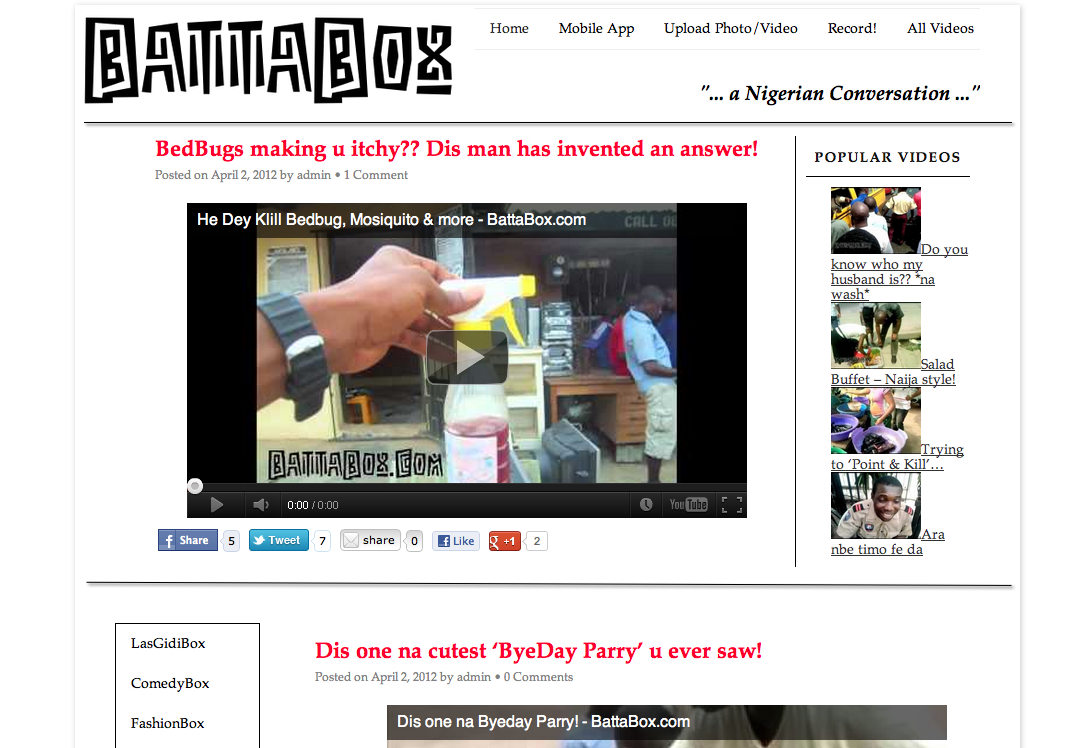
Battabox, co founded by Christian Purefoy and Yemisi Ilo, is an online social television platform developed in Nigeria that aims to provide everything Nigerian from music, film, street-life to news, comedy and cooking using the YouTube platform. Crowdsourcing videos is an important part of the Battabox strategy and they were able to achieve this using YouTube Direct running on Google App Engine integrated into their website. They also provided an Android App that enables users to upload videos directly from their Android phones.


Battabox website screenshot

There are many other examples from further afield. In South Africa we met Nomanini who have a Google App Engine backend for Lula, their airtime vending device, which promises to change the way airtime is distributed in the region. Envaya SMS is an amazing application that turns your Android phone into an SMS gateway and has been used by many NGOs in East Africa. SAF SMS is a school management solution built with Google Web Toolkit that has been adopted in more than 100 schools in Nigeria. We also met Serengeti Advisers, a consultancy firm in Tanzania that uses Google Chart Tools to create interactive reports on their website.


Nomanini’s Lula terminal communicates with a backend powered by Google App Engine

As part of our drive to meet and interact with app developers in Africa, our Android Developer Relations team also recently hosted the developers of AfriNolly and the Nigerian Constitution Android app on their weekly Android DevRel office hours hangout on Google+ for Europe, Middle East and Africa. At the hangout, these African developers shared information about their apps with other Android developers.

You can follow the exploits of these and more developers in Sub Saharan Africa as they continue to make things happen with Google APIs and platforms by keeping an eye on our case studies page.

Do you feel your app should be featured here? Let us know!


Chukwuemeka Afigbo is a Program Manager in the Sub-Saharan Africa Outreach Team. He is an avid football (soccer) fan.

Posted by Scott Knaster, Editor

Tuesday, 10 May 2011
Facebook StumbleUpon Twitter Google+ Pin It

Making stories with social media and YouTube videos


By Xavier Damman, co-founder of Storify

This post is part of Who's at Google I/O, a series of guest blog posts written by developers who are appearing in the Developer Sandbox at Google I/O.


Storify is part of the Google I/O Sandbox. Please come say hi to find out more about how you can leverage our APIs so your users can remix your content to create stories to share on social networks.

Storify provides a super simple drag and drop user experience to create stories using elements from the web: tweets, YouTube videos, Facebook updates, SlideShare presentations, audioboo files, and so on (see Storify in action here). This post explains how we incorporate videos in Storify using YouTube Data API and Player API. All the code snippets are in JavaScript. In fact, our full stack is in JavaScript: we use NodeJS and MongoDB which we think is an über cool mix.


The source of the source

To create a Storify source, we need to be able to get a feed of results using JSONp (basically JSON with a callback function so that you can do cross domain calls; from the YouTube API perspective this is the JSON-C format). For YouTube, the main search API endpoint looks like this:
request: function(formdata) {
return {
'url' : 'http://gdata.youtube.com/feeds/api/videos',
'params': {
'v' : 2,
'max-results' : 20,
'alt' : 'jsonc',
'q' : formdata.keywords
}
};
}
This function is called when the user clicks Submit in the search tab of the YouTube source in the Storify Editor. The main controller executes the request and sends the JSON result to the results method, which returns an array of normalized results:
results: function(json) {

if (json.data && json.data.totalItems && json.data.totalItems == 0) {
throw "No results found";
}

var videos = json.data.items;
var results_array = [];

for (var i = 0; i < videos.length; i++) {
var normalizedResult = {
permalink : 'http://www.youtube.com/watch?v='+videos[i].id,
source : 'youtube',
elementClass : 'video',
metadata : videos[i],
thumbnail : videos[i].thumbnail.sqDefault,
title: videos[i].title,
description : videos[i].description.substr(0,140),
author: {username: videos[i].uploader },
created_at : videos[i].uploaded,
oembed: {html: '<iframe id="youtube-'+videos[i].id+'" type="text/html" width="360" height="294" src="http://www.youtube.com/embed/'+videos[i].id+'?enablejsapi=1&origin=storify.com" frameborder="0">'
}};

results_array.push(normalizedResult);
}
return results_array;
}

Thanks to this normalized representation of a story element – in this case, it’s a video object – we can build an object-oriented story as the user drags and drops any of these elements. This technique has multiple benefits: we maintain attribution to the original content creator, and we can track the content as it spreads across the web (how many times it has been seen and from where).

The story element also provides the oEmbed HTML code. This is used to render the video embed when the video is added to the story. For that purpose we use the YouTube Player API with their new iframe embed.

Story.json

We have a very simple way to get any data out of our platform: just append .json to any storify.com URL and you get the JSON representation of the content of that page.

For example:

Add the Storify Editor to your site

The Storify Editor can be called in an iframe. You just need to provide a callback parameter, like this: http://storify.com/story/new?callback=yoursiteurlcallback. The user will be asked to authenticate with Twitter and then will be able to create a new story. Once the user is done and hits “Publish”, we call you back, passing you the permalink of the new story created:
yoursiteurlcallback?permalink=storyPermalink.

You can then either fetch the JSON of the story by appending “.json” to the storyPermalink or you can embed the story by loading <script src=”storyPermalink.js”></script>. This is a great way to provide your community with a way to create stories right from your site.


This is only the start. We plan to open a Sources API so that any developer can build a source for any service. Please come see us at our booth at the Google I/O Sandbox if you’re interested in joining our developer community. And check out this article in the New York Times to learn more.


Come see Storify in the Developer Sandbox at Google I/O on May 10-11.

Xavier Damman is the co-founder of Storify. He is also the founder of HackDemocracy, a community of hackers who want to improve our democracies using technology.

Posted by Scott Knaster, Editor

Thursday, 28 April 2011
Facebook StumbleUpon Twitter Google+ Pin It

ShortForm: mix and share the world's videos

By Jereme Monteau, Lead Developer at ShortForm

This post is part of Who's at Google I/O, a series of guest blog posts written by developers who are appearing in the Developer Sandbox at Google I/O.


ShortForm is a new entertainment medium where you find continuous channels of the best videos, curated by a growing community of VJs. At ShortForm you can be a viewer, a VJ, or both. Viewers subscribe to channels of interest, lean back, and enjoy a continuous stream of videos.


The developers at ShortForm worked with various YouTube Data APIs in order to deliver both the Viewer and VJ experience.

Standard feeds and user playlists. ShortForm makes it easy and fun for anyone to VJ a channel. We also auto-curate a select set of channels to surface mainstream content that would appeal to most audiences. For example, our YouTube Hits channel includes content from the standard YouTube video feeds such as Top Rated, Most Viewed and Most Popular. ShortForm developed a system for retrieving video entries and their associated metadata, and then ordering them in playlists based on a ranking algorithm.

Favorites and uploads. ShortForm allows VJs to import their YouTube favorites and uploads into their channels quickly and easily by authenticating via YouTube’s OAuth provider. Once a user has connected their ShortForm account to their YouTube account, we are able to allow them to import their favorites and uploads through an authenticated call to the YouTube Data API. In the future we will streamline the process of uploading videos to YouTube by allowing VJs to upload videos to YouTube directly from ShortForm while adding those videos to their ShortForm channel in the same flow.


Player API. Providing a seamless channel viewing experience on ShortForm requires that we integrate tightly with YouTube’s JavaScript API to the ActionScript 3 player. This allows us to properly handle video events to ensure continuous playback. Users have full control over their viewing experience using the next and previous video buttons, which load videos into the YouTube player. We have also begun integrating with the new iframe embed style that is currently in beta and have seen promising results in our initial tests across desktop and mobile platforms.

Android tablet. Tablet computing represents an exciting opportunity for ShortForm to provide a first-class viewing experience in a new package. We have begun testing and looking for places to optimize the viewing experience on tablet devices.

ShortForm widget. Our embeddable widget syntax was inspired by YouTube’s new iframe embed syntax. We believe this is the simplest, most flexible and most powerful way to allow our users to embed their channels anywhere on the web.

We are thrilled to be a part of Google I/O and in order to demonstrate the power of ShortForm, we are putting together a Google I/O Sandbox channel, a continuous channel of product pitches and demos from companies represented in the I/O Developer Sandbox. We invite all Sandbox companies to submit a video of their product pitch or demo. Details can be found at the ShortForm at Google I/O page. We'll use the channel to preview cool companies in the Sandbox before the conference. The channel will also provide media members with a summary of all the technology from all Sandbox companies.

Lastly, we are going to have a little fun and invite all attendees to vote on their favorite pitches and demos. Submit your video on the ShortForm at Google I/O page. We’ll surface a leaderboard showing videos with the top votes, and the winning entry will be highlighted in a press release and will get prime placement on ShortForm’s homepage for one week, reaching hundreds of thousands of people.


Come see ShortForm in the Developer Sandbox at Google I/O on May 10-11.

As a founding member of ShortForm, Jereme has been hacking around with the YouTube APIs for over a year now and has been building software for 15 years. When he’s not coding he’s probably trail running or roasting his own coffee while eagerly anticipating the arrival of his first child in June.

Posted by Scott Knaster, Editor

Monday, 21 June 2010
Facebook StumbleUpon Twitter Google+ Pin It

Interactive Transcripts and Automatic Captions for Developer Videos

Did you notice the new Interactive Transcript feature that lets you scan quickly through the full text of any owner-captioned video that you’re watching on YouTube? For videos from I/O, that means you can quickly scan through a 60 minute talk to find just the part of the talk that you need to see. Or use your browser search with the Interactive Transcript to find a mention of an API call, and then click on a word in the transcript to jump straight to that part of the video.

Because developers don’t all speak English (and because some developers speak really fast when presenting) we caption every video that we post to http://www.youtube.com/googledevelopers. Most of the year, that’s a pretty easy thing to keep up with. But last year, when we posted all the videos for Google I/O 2009, it took us months to get everything done.

This year, we captioned everything within 24 hours or less of the videos going live. I’m excited about that, because it wouldn’t have been possible without the new auto-caption and auto-timing features in YouTube. We also did something a little nerdy -- we used four different methods of captioning.

If you use YouTube to share talks from your own developer events, you might find this summary useful.

The two fastest options for producing and cleaning up our captions used auto-timing. We uploaded a transcript and had YouTube’s speech recognition calculate the timecodes for us.

The two auto-timing methods were:

  • CART live real-time transcript + auto-timing
    Because we had professional real-time transcriptionists at I/O, we could instantly caption anything that had a live session transcript. That’s how we got the keynotes captioned on the day of the event. We also used this method for the android talks.

  • Professional transcription + auto-timing
    This was less expensive than CART, and faster than full captions with timecodes, but slower than real-time transcription because we had to get video files to the transcribers.

Although these methods were fastest, auto-timing turned out not to be perfect for all videos. When mic quality varied, or we had too many speaker changes in a short period of time (e.g panel discussions or fireside chats), the timing sometimes slipped out of sync. You can still use the Interactive Transcript to see what was said, but it’s not ideal.

The two slower methods that we used were:

  • Pure 'traditional' captioning
    This is what we did last year for Google I/O 2009 videos. It’s slower, and more expensive, because you have to transcribe and set all the timecodes correctly. But the end result is 100% accurately timed. We did this to fix a video that the auto-timing had a lot of difficulty with.

  • Speech recognition (auto-captions) with human cleanup and editing
    This gave us perfect timecodes, just like traditional captions, and took less time than traditional captioning. It took slightly longer than auto-timing alone because we had to download the machine-generated auto-captions from YouTube to do the edits.

    Automatic captions are fantastic if you don't have time or budget to put any work into your captioning. But for I/O, we wanted our captions to be perfect on technical terms, so fully automatic captions weren't the best fit.

Not all of these methods are equal in terms of quality, but it’s interesting to compare. To see which method was used on a video, look for the track name in the caption menu. To compare owner-uploaded captions with pure machine-generated auto-captions, you can always choose ‘Transcribe Audio’ from the caption menu for our videos.

If you’d like to help improve caption quality, please watch a video and fill out our caption survey to tell us what you think of these captions! We know some of them are going to be a little off -- if you report issues, we’ll fix them.

Monday, 22 March 2010
Facebook StumbleUpon Twitter Google+ Pin It

Making APIs Faster: Introducing Partial Response and Partial Update

At Google, we strive to make the web faster. Today, we’re proud to take our first big step in making APIs faster by introducing two experimental features in the Google Data Protocol, partial response and partial update. Together, partial response and partial update can drastically reduce the network, memory, and CPU resources needed to work with Google APIs.

It’s easy to understand the benefit of partial response and partial update. Imagine that you are writing a new Android calendar widget, and you want to display the time and title of the recently changed events on your Google Calendar. With the old Calendar Data API, you would request your calendar’s events feed and receive a large amount of information in response -- including lots of extra data like the attendee list and the event description.

With the addition of partial response, however, you can now use the fields query parameter to request only relevant information -- in this case, event titles and times. Constructing such a request using the fields query parameter is simple:

GET http://www.google.com/calendar/feeds/zachpm@google.com/private/full?fields=entry(title,gd:when)

By including the entry argument and specifying title and gd:when, this request ensures that the partial response contains only the title and time for each event, along with a small amount of wrapping metadata.

But say you want to also enable the widget to change the time of calendar events. With partial update, you can easily accomplish this: simply edit the data you received in the partial response and use the HTTP PATCH verb to send the modified data back to the server. The server then intelligently interprets your PATCH, updating only the fields you chose to send. Throughout this entire read-modify-write cycle, the unneeded data remains server-side and untouched.

Now for a quick demo. If you’re currently logged into a Google account, compare the size of your full calendar feed and your partial calendar feed. When we ran this test, our full calendar feed contained 160 kB of data while the partial feed only contained 8 kB -- the partial response successfully reduced total data transfer by 95%! Performance enhancements like this are especially apparent on a mobile device, where every byte of memory and every CPU cycle count. In nearly all clients, partial response and partial update make it more efficient to send, store, parse, cache, and modify only the data that you need.

As of today, partial response and partial update are supported in four Google APIs:
... and we’re planning on adding support for most of the APIs that are built on the Google Data Protocol soon. Stay tuned for more information, and if you can’t wait, feel free to lobby for partial update and partial response in your favorite API’s public support group. And for those of you who’ll be at Google I/O this year, be sure to check out the Google API sessions that are in store.

Thanks for joining us in our effort to make APIs on the web as fast and as efficient as possible!

Friday, 29 January 2010
Facebook StumbleUpon Twitter Google+ Pin It

Flashy New Authentication: AuthSub Adds Support for ActionScript

Today, we are happy to announce the launch of AuthSub for ActionScript, a new component of the well-known AuthSub authentication interface for the Google Data Protocol. This new feature enables Flash and Silverlight applications to access data securely on behalf of a user, without the application ever seeing the user’s private login credentials.

To use AuthSub for Actionscript (or as we’re calling it, AuthSubAS), first ensure that the API you are accessing offers cross-domain support. To do this, simply check for a crossdomain.xml file like those offered by the Picasa Web Albums Data API and the YouTube Data API. Then, if the API supports cross-domain scripting, you can simply point your Flash app to https://accounts.googleapis.com/accounts/AuthSub{Request,SessionToken} and authenticate. If you’re familiar with how AuthSub for JavaScript works, AuthSubAS works in much the same way. For more information, see the AuthSub for ActionScript guide and check out this code sample.

Currently, cross-domain requests are only supported by the Picasa Web Albums Data API and the YouTube Data API.  However, as more APIs offer cross-domain scripting through an open crossdomain.xml file, the AuthSubAS authentication will work automatically. For questions about a specific API or to encourage your API to provide AuthSubAS support sooner, visit your API’s support group in Google Groups.

Friday, 20 November 2009
Facebook StumbleUpon Twitter Google+ Pin It

Captions available for all Google I/O videos

We work hard to make sure that the videos on the GoogleDevelopers channel on Youtube are captioned, but when I/O added over a hundred hours of video content, we got a little behind. I'm happy to announce that we're finally caught up! Every English and Spanish video from I/O now has captions that you can turn on in YouTube.

Didn't know we had captions? Just click to select captions from the menu in the lower right corner of the video player.

Some caption and subtitle-related news:
  • A group of volunteers from Russia used the translated.by software to crowdsource translation for Google Wave video captions. Thank you, habratranslation! Check out one of the Wave videos with Russian subtitles. (You have to choose Russian from the caption menu in YouTube to see them.)

  • If you'd like to help translate captions for any of our videos, please email google-video-captions@googlegroups.com with a request. We'd be happy to share any caption files that you might be interested in under a creative commons attribution license. If you send us the translation, we'll credit you in the video caption track and blog about how awesome you are.

  • In addition to machine translation for captions, YouTube now provides experimental automatic caption transcription using the same speech recognition algorithms found in Google Voice. The GoogleDevelopers channel is part of the initial pilot, so this feature is available on many of our videos. To learn more, check out the blog post on the Official Google Blog.

Wednesday, 18 November 2009
Facebook StumbleUpon Twitter Google+ Pin It

The latest addition to Google's open source projects

Did you know Google has released more than 300 open source projects to date? Yesterday, we announced the latest addition to Google's open source projects - YouTube Direct, a new tool that enables any developer to solicit video submissions, moderate and display them on their website, all powered by YouTube. We recognize the role that open source plays at Google and how it helps us create better applications and we try to give back to the community as much as possible.

YouTube Direct was built on top of YouTube's public APIs and is designed to run on Google App Engine - Google's highly scalable platform. To date, several media organizations like ABC News, The Huffington Post and Politico have taken advantage of the open platform to deploy their own version of YouTube Direct to empower citizen journalism and enrich their site in the process. We look forward to see for more creative usage of the tool.

Monday, 4 May 2009
Facebook StumbleUpon Twitter Google+ Pin It

Putting the Web in Web Applications

This post is part of the Who's @ Google I/O, a series of blog posts that give a closer look at developers who'll be speaking or demoing at Google I/O. Today's post is a guest post written by Ross Boucher, co-founder of 280 North.

When we set out to build 280 Slides, we wanted to create an application that made no concessions: something that felt as interactive as the desktop experience, while leveraging all the benefits of being online. We coined the term "desktop-class applications" as a way to describe our vision for what web apps should be. We also knew it wasn't enough to just recreate a desktop presentation tool pixel for pixel. We wanted to do something new, and to truly take advantage of being a web based solution.


The key to having a great presentation is having great media. A picture that helps tell the story with infinitely more clarity, or that just helps tell a good joke. A movie that shows a demo of your cool new widget that everyone's going to buy. Not all presentations, and not all individual slides will work this way, but the kind of in-person, captivating speech that Steve Jobs would enjoy relies almost entirely on images. And, of course, an engaging presenter.

So, if having great media is key to having a great presentation, it's important to be able to find great media for your presentation. Not all of us have an art department on hand, so we made this idea central to 280 Slides, and we did it with a lot of help from Google APIs.


If you take a look at what we call the Media inspector, you'll see we have top level choices for pictures, movies, and shapes. Both the pictures and movies tabs let you search popular web services to find the perfect media for your presentation.

When you search for a picture, we send a request to our server, which then sends out requests to several web services. Google's AJAX Search APIs actually enable us to perform server side searches as well, thanks to the Flash and Other Non-JavaScript section of the API. On the server side, this lets us send requests to Google and Flickr at the same time, and convert the responses to a consistent data format.


We're excited about finding other ways to integrate with Google services as well. For example, we hope to eventually enable publishing a presentation directly to YouTube, and use Google to log in to our service rather than having to create a new username.

We're also planning on changing the way we interact with the Google APIs. In addition to 280 Slides, our company makes a web application framework called Cappuccino. The media integration in 280 Slides has been a huge hit with our users, so we plan to build this feature directly into Cappuccino and let anyone building a web app integrate media searching with little effort. This means changing our approach from server-side to client side aggregation using JSONP. The AJAX APIs, YouTube APIs, and all the other APIs we use are now available by using JSON with padding. JSONP lets us work around the browser's same-origin policy to better integrate with third-party web services without proxying through a server.

280 North is going to be at Google I/O on May 27-28 to show off 280 Slides and how we integrate with the Google APIs. We'll also be showing off the beginnings of integrating this in Cappuccino which should be interesting to JavaScript developers. We hope you'll stop by the Sandbox!

If you want to learn more about how 280 Slides uses Google APIs, check out these Google Code videos with one of the co-founders:


Friday, 17 April 2009
Facebook StumbleUpon Twitter Google+ Pin It

Wearing our Developers' Shoes

I set a quarterly goal to write an application in my 20% time that uses publicly available Google APIs. While some would call this scenario testing, I refer to it as "method user experience design" (think method acting). The process can often be painful, but I do it in the hope that it will make me a better designer. It puts me in the shoes of our customers who build products on top of Google's products. I read the same documentation, search the web for the same solutions, write code against the same APIs, and deploy to the same infrastructure. From this exercise come product improvements and empathy. I also enjoy attempting to make something useful, sketching with Python and JavaScript (the charcoal and conte crayon of web development), and proving that 20% time is alive and well.

When it came time to pick last quarter's application, I wanted to work with YouTube's APIs for two reasons: I have a background in video (as a filmmaker and as a software designer) and I wanted to share family videos with my oldest brother, who is hard of hearing and learning disabled. Fast forward a few months later and I had CaptionTube, an application for creating captions for YouTube videos. CaptionTube has launched on TestTube and Hiroto has written a post about it on the YouTube blog.

In addition to the YouTube Data and Player APIs, the application is hosted on Google App Engine and uses the Datastore, Google Accounts, Mail, and URLFetch Python APIs. I used several open source software projects to create it: Django and jQuery, and app-engine-patch. If you are attending Google I/O in May and would like to ask me questions about my experience or discuss your experience using Google's developer's products, please look for me in the developer sandbox or office hour sessions.

Thursday, 5 February 2009
Facebook StumbleUpon Twitter Google+ Pin It

New! Caption files for Google Developer Videos


Last year, YouTube launched a Captions and Subtitles feature. In addition to launching a new playlist for captioned Developer Videos, we're also kicking off an Open Source project to host caption files that anyone can reuse under the terms of the Creative Commons 3.0 BY license.

We're hoping that developers will come up with interesting uses for caption data, once it's in the public domain. You can use transcripts as a corpus for training speech-to-text algorithms or testing applications that read and write caption files. Or, combine timepoint data with YouTube's URL support to jump to a specific point in a video.

Caption tracks make YouTube videos accessible to a wider audience. For example, try a search on [RESTful protocol YouTube] and you'll find search results from the captions on Joe Gregorio's recent talk.

While we're delighted that Kevin Marks' captioned English accent can be more easily understood by Americans, we've also translated the caption files and provided tracks in multiple languages for a few of our captioned videos. For all other videos, YouTube can perform Auto-Translate on caption text using Google Translate technology.


To learn more about YouTube caption file formats, take a look at the YouTube Help Center. If you're interested in contributing caption files for videos on Google channels, or making translations available, please consider joining the project.

We hope you'll find these additions useful. Happy reading!

Thursday, 11 December 2008
Facebook StumbleUpon Twitter Google+ Pin It

YouTube <3's Developers


There's been a small flurry of announcements lately about things the YouTube APIs team has done to make life easier for our developers, and we wanted to make sure you heard about them!

Backwards compatibility guidelines
Since we just launched V2 of the API, we also published some guidelines and best practices to help ensure that breaking changes aren't introduced into your app with new versions. Read more in our "Mandate For Change" post.

Test your apps against new builds
A week before new builds are pushed to production, they'll go up on stage.gdata.youtube.com. Subscribe to our announcement forum to get notified about new builds, and do regression testing by pointing your app at stage.gdata.youtube.com. Read more in our "All the World's a Stage" post.

Interactive query generator
We released a helpful tool to play with API requests in the browser so you can get a feel for the mechanics. Because we show you the raw request and responses, it's also an easy way to do some quick testing and debugging. Read the full announcement in our "Try Before You Buy" post.

YouTube App Gallery
To help get you get some exposure and to help new developers get some inspiration, we launched the gallery. Browse, comment, and rate projects as well as submit your own. Read the full announcement here.

We hope this helps both new and old YouTube developers alike. Let us know how it's going in the discussion forum.

Thursday, 12 June 2008
Facebook StumbleUpon Twitter Google+ Pin It

Registration Open for "Powered By YouTube"


The YouTube APIs team had so much fun at Google I/O that we thought it was about time to have our own event at our office in San Bruno. (Check out the announcement on the YouTube API Blog for a video of the office.) This will be all YouTube APIs, all the time! The agenda is still being finalized, but we'll have "bigger picture" sessions as well as nitty gritty hacking time to get started and learn best practices. You'll have time to mingle with a diverse set of developers from different companies and the YouTube engineers and product managers.

If you're interested, here are all the details:

Thursday, July 10, 2008
10:30am - 5:00pm (tentative)
YouTube HQ @ 901 Cherry Ave. San Bruno, CA 94066
Cost: Free

Please reserve your spot and register early at Powered By YouTube.

Already have questions, comments, or session suggestions? Let us know in the forum. Hope to see you here next month!

Monday, 17 March 2008
Facebook StumbleUpon Twitter Google+ Pin It

YouTube / Picasa Web Albums APIs Hackathon at the 'plex


As promised in my last post announcing the new YouTube developer offerings, we're hosting a hackathon for the YouTube and Picasa Web Albums APIs at the Googleplex on March 27th, 2008.

We'll give overviews of both APIs, go over new features, and run some codelabs to get you started. If you're already familiar with both the APIs, stop by to meet the teams, ask questions, and find other developers to work on projects with.

There will be two sessions -- one from 3PM - 6:30PM and another from 6:30PM - 10PM. Feel free to stay the whole day, or just come for the session you have time for. Don't worry about food and caffeine -- we've got you covered.

Interested? Please RSVP and let us know.

Hope to see you there!

Tuesday, 11 March 2008
Facebook StumbleUpon Twitter Google+ Pin It

YouTube APIs for developers and for... iguana enthusiasts


Ever wanted to get in on the online video craze? Now's a good time! We've just added upload, write, and authentication functionality to the YouTube Data API. Brand new player APIs and tools are also now available.

That means that if, for example, you run a site just for iguana enthusiasts, your users can upload videos of JubJub to their YouTube accounts, post comments, create iguana playlists, and more, all without leaving your site. And with the new player APIs and the new chromeless player, you can completely customize and skin the YouTube embedded player to match the look and feel of your site (a green theme, buttons that look like scales?).

So excited that you can't decide what to do next? Read more details over at the YouTube API blog, watch our engineers talk about the new features (on YouTube, where else?), check out the docs, then join the forum.

You can also mark your calendars -- we'll be holding a YouTube / Picasa hackathon on March 27th at the Googleplex in Mountain View. Stay tuned for more info.

Thursday, 3 January 2008
Facebook StumbleUpon Twitter Google+ Pin It

Google Developer Courses on YouTube


Wow, it's been nearly 4 months since we started the Google Developers channel on YouTube! We wanted a place to post talks, announcements, interviews, and anything else that might interest outside developers (and other fans). Now, we're building out more tutorial / lecture content -- something that hobbyists and seasoned programmers can watch to get their feet wet with our products.

We know that one of your New Year's resolutions must be to learn a new API, so check out our first videos on Gadgets and Google Data:

Three videos about Getting Started with Gadgets by "the Dans" (Daniel Lee and Daniel Holevoet):


An Introduction to Google Data by Jeff Fisher:


We're just getting started, so subscribe to the Google Developer Courses playlist for updates. There are many ways for you to keep up to date:

You can subscribe through YouTube by clicking the "Subscribe" link here:
http://www.youtube.com/profile_play_list?user=GoogleDevelopers.

Or, add the playlist directly into Google Reader or iGoogle:
Add to Google

Finally, you can also put the Google Data feed into your reader of choice: http://gdata.youtube.com/feeds/playlists/A930398A6117E70C

Let us know what you think! If there are any particular tutorials you'd like to see, post a comment below.